
Create an in-page push campaign
Summary
Create your advertising campaign and start buying traffic on DAO.AD.
Before You Begin
- Role: Advertiser.
- Required information:
- Campaign name
- Campaign pricing model
- Estimated time: 7-10 minutes
Steps
- In the top menu, go to Campaigns → Push InPage.
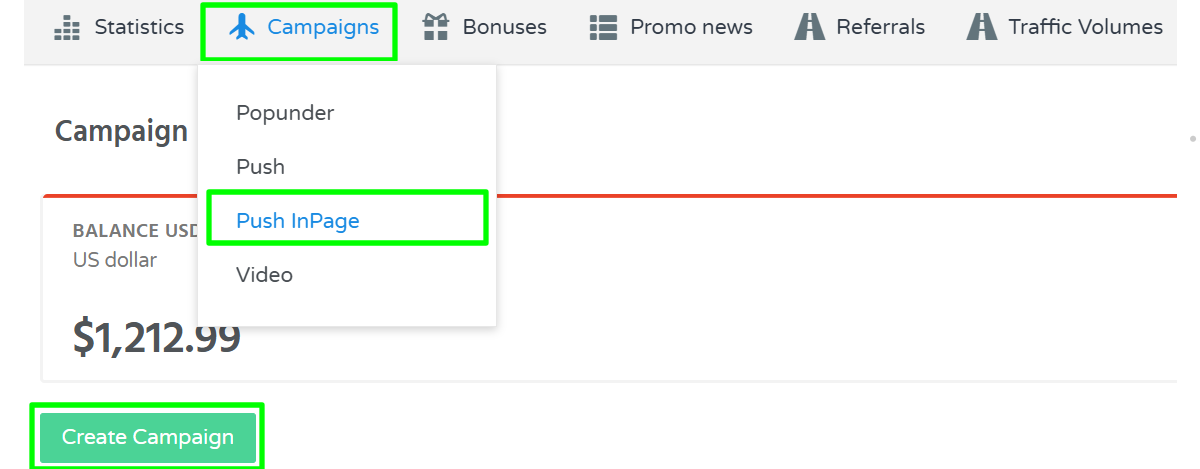
- Click the "Create Campaign" button.
- Enter the campaign name and select the campaign mode.
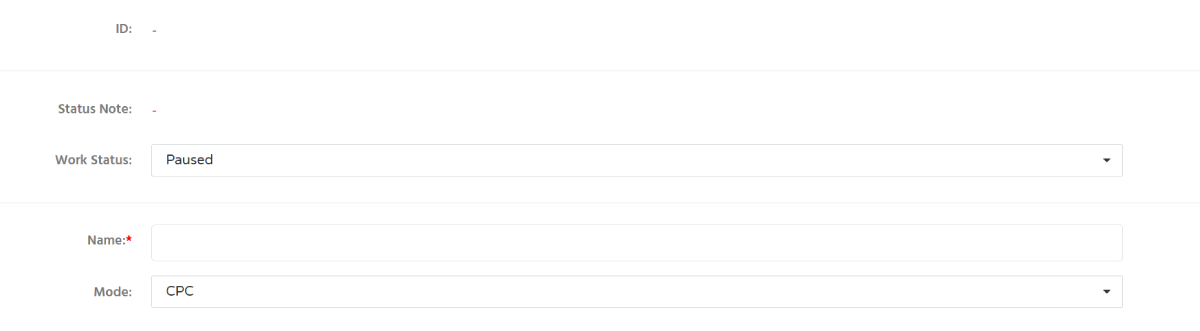
Information: All newly created campaigns are set to Paused by default to prevent unintended traffic spending.
4. Scroll down to configure the remaining campaign settings and save the campaign.
Troubleshooting
Issue: Campaigns menu is missing
Solutions: If you do not see the Campaigns menu, your account may be registered as a Webmaster account. Contact DAO.AD Support for assistance.
Issue: Unable to select a different campaign mode
Solution: DAO.AD Push In-Page campaigns currently support only the CPC pricing model.