
Push Subscription Flow
Summary
Learn how the Push advertising format works in DAO.AD, from the visitor's first interaction with your website to subscription collection, ad delivery, and revenue generation.
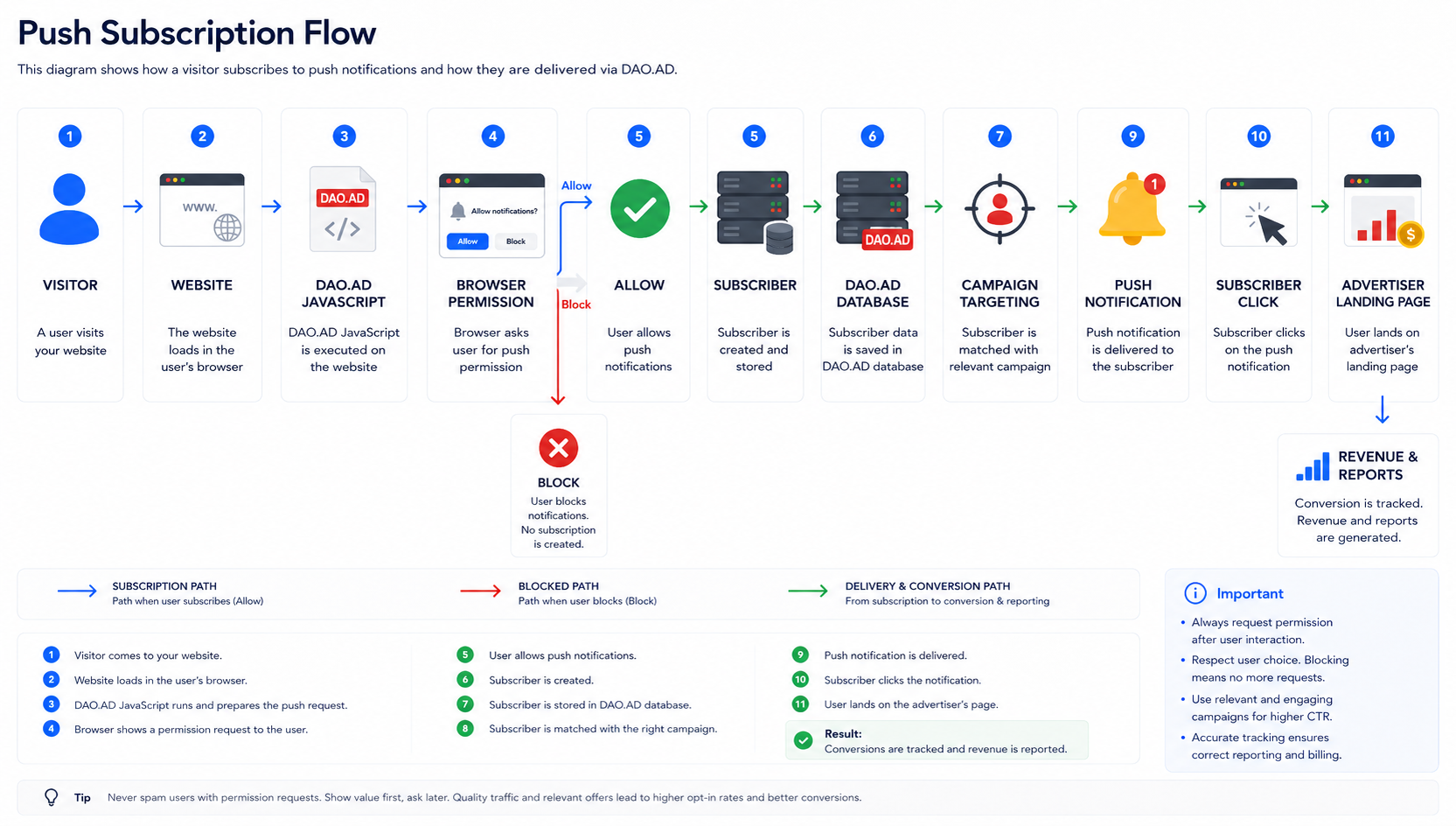
Overview
The Push subscription process consists of several stages.
- Visitor opens your website.
- JavaScript initializes the Push SDK.
- The browser requests notification permission.
- The visitor accepts or declines the request.
- A subscription is created.
- DAO.AD starts delivering push notifications.
- You earn revenue from subscriber activity.
Stage 1: Visitor opens your website
The visitor loads a page containing the DAO.AD JavaScript code.
The script initializes automatically after the page has finished loading.
Stage 2: Permission request
Depending on the selected integration type and display settings, the browser displays a notification permission request.
The visitor can either:
- Allow notifications
- Block notifications
Only visitors who allow notifications become subscribers.
Stage 3: Subscriber registration
After permission has been granted:
- the browser generates a Push subscription;
- DAO.AD assigns a unique subscriber identifier;
- the subscriber is securely stored in the DAO.AD platform.
Stage 4: Campaign delivery
Once a matching campaign becomes available:
- DAO.AD selects an eligible subscriber;
- the notification is delivered;
- delivery respects frequency caps, targeting, and campaign limits.
Stage 5: User interaction
The subscriber may:
- ignore the notification;
- dismiss it;
- click it.
Only clicks redirect the subscriber to the advertiser's landing page.
Stage 6: Revenue generation
When the subscriber clicks the notification, DAO.AD records the event and calculates your earnings according to the campaign pricing model.
Revenue is displayed in your statistics and included in future payouts.
Best Practices
- Request permission only after the visitor has engaged with your website.
- Avoid showing permission requests immediately after page load.
- Place the JavaScript code on every page where subscriptions should be collected.
- Regularly monitor subscription rates and notification performance.