
Fund Your Account
Summary
This guide explains how to add funds to your DAO.AD advertiser account using the available payment methods.
Funding your account is required before launching advertising campaigns. DAO.AD supports multiple payment methods and currencies depending on your region.
Before You Begin
- Role: Advertiser
- Required information:
- Billing details
- Promo code (optional) - Estimated time: 2 minutes
Steps
- Before funding your account, make sure your profile information is complete.
- Go to your User Profile and complete all required fields:
- your name (if not present)
- your last name
- country of residence
- billing address - Save information, confirming by current password.
- If you are funding the account on behalf of a company, also provide:
- company name
- Reg. numer
- Tax number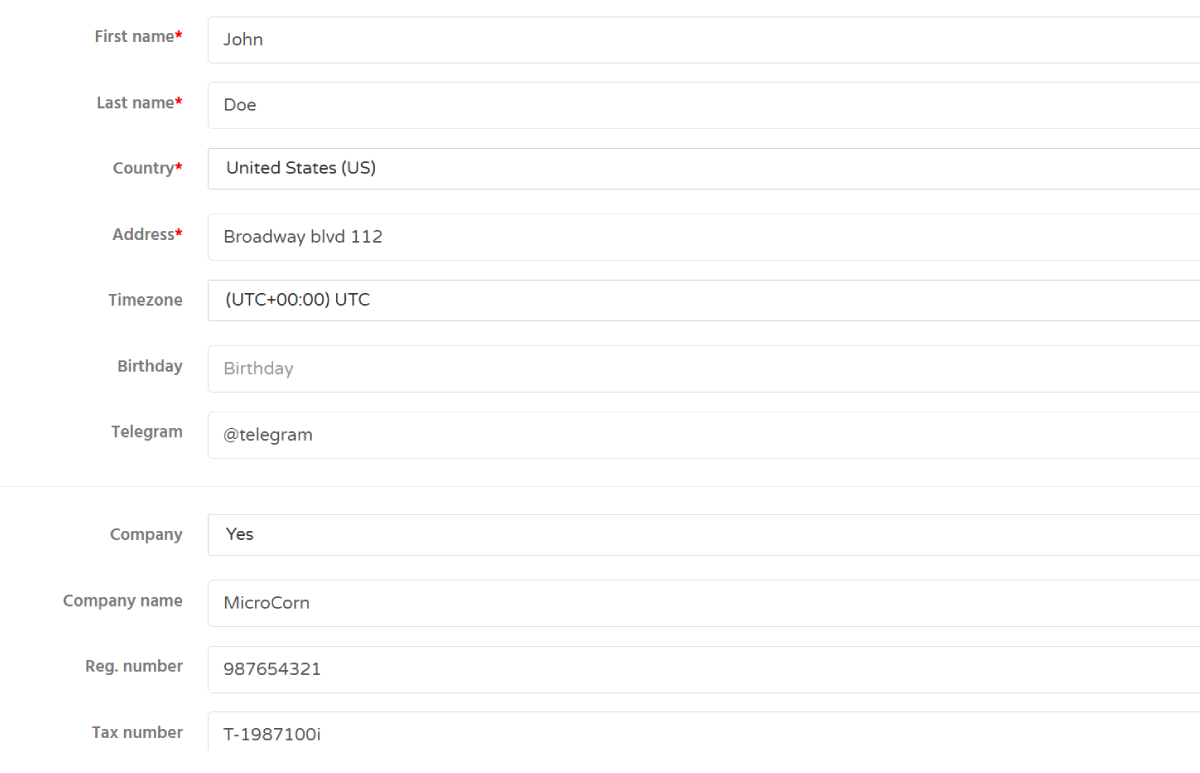
- Open the Balance page or click your current account balance in the top-right corner of the dashboard.
- Select your preferred payment method and follow the on-screen instructions.
Minimal deposit 50 USD
DAO.AD does not charge additional fees for deposits. Any transaction fees depend on the selected payment provider, your country of residence, and possible currency conversion rates applied by your bank or payment service.
7. If you have a promo code, enter it during the deposit process to receive additional bonuses.
Troubleshooting
Issue: Some payment methods are not available.
Solutions: Some payment methods may not be available directly through the platform. If your preferred method is not listed, contact DAO.AD support to discuss alternative payment options.
- Examples of alternative payment methods:
- Payoneer
- Bank Transfer
- ACH Transfer
- Other region-specific payment solutions