# Optimization
# Blacklist and Whitelist Targeting
##### Summary
Use blacklists and whitelists to block or allow traffic from specific sources and IP ranges.
##### Before You Begin
- Role: Advertiser
- Required information:
- source IDs
- IP addresses or CIDR ranges
- Estimated time: 2-4 minutes
##### Steps
**Option 1: Blacklisting of sources**
1. On the campaign creation page, locate the **Black\\White list** section and the **Blacklist of sources**
2. Enter the Source IDs to block, separated by commas.
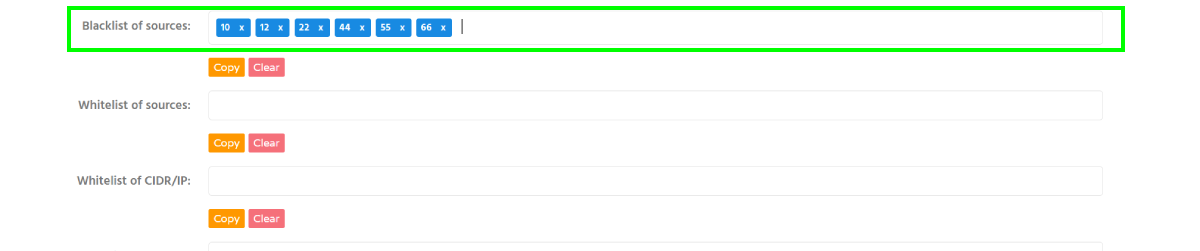
**Option 2: Whitelisting of sources**
1. On the campaign creation page, locate the **Black\\White list** section and the **Whitelist of sources**
2. Enter the Source IDs to allow, separated by commas.
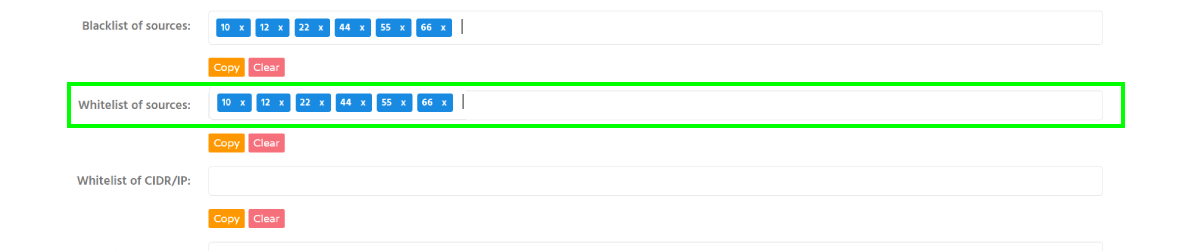
**Information:** Use the `{source_id}` parameter in your tracking URL or postback to identify traffic sources.
**Option 3: IP and CIDR Whitelisting/Blacklisting**
1. On the campaign creation page, locate the **Black\\White list** section and the **Whitelist of CIDR/IP**
2. Enter IP addresses or CIDR ranges in the appropriate whitelist or blacklist field. Both IPv4 and IPv6 CIDR ranges are supported.
##### Troubleshooting
**Issue:** I'm still receiving traffic from a blacklisted source
**Solution:**
- blacklist changes are not always applied instantly. Users who already received a notification may still generate clicks.
##### Verification
After saving the campaign, the configured Source IDs or IP ranges will appear in the corresponding blacklist or whitelist field.
##### Related
- [Targeting by vertical](https://wiki.dao.ad/books/getting-started/page/targeting-by-vertical "Targeting by Vertical")
- [Traffic volume and bid recommendations](https://dao.ad/en/traffic-volumes)
- [Targeting by operating system](https://wiki.dao.ad/books/getting-started/page/targeting-by-operating-system "Targeting by operating system")
- [Automatic Rules for Blacklisting](https://wiki.dao.ad/books/optimization-reporting/page/automatic-rules-for-blacklisting "Automatic Rules for Blacklisting")
# Micro-bidding Tool
##### Summary
Use the Micro-bidding Tool to assign different bids to specific Source IDs or Sub IDs.
##### Before You Begin
- Role: Advertiser
- Required information:
- source IDs and/or Sub IDs
- Estimated time: 2-4 minutes
##### Steps
1. Locate the **Black/Whitelist** section and the Micro-bidding Rules field.
2. Click **Add bid rule** to create a new bidding rule.

3. Enter the Source IDs or Sub IDs and set a custom bid for them.
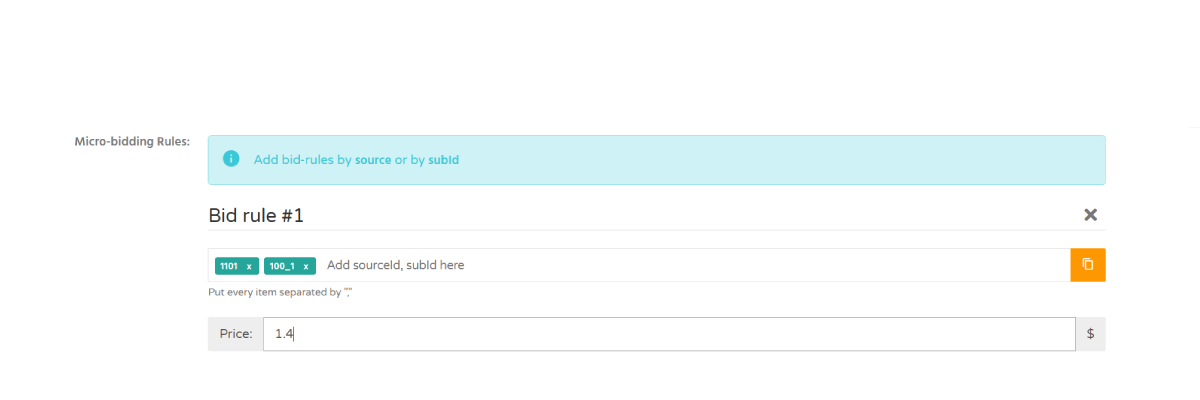**Information:** Micro-bidding rules override the default campaign bid for the specified Source IDs or Sub IDs.
4. Repeat the process to create additional bidding rules if needed.
##### Troubleshooting
**Issue:** I don't know the Source IDs or Sub IDs
**Solution:**
- use the `{source_id}` and `{sub_id}` parameters in your tracking URL or postback to identify traffic sources and sub-sources.
##### Verification
After saving the campaign, the configured source IDs or sub-source IDs will appear in the corresponding bid-rule field.
##### Related
- [Blacklist and Whitelist Targeting](https://wiki.dao.ad/books/optimization-reporting/page/blacklist-and-whitelist-targeting "Blacklist and Whitelist Targeting")
- [Traffic volume and bid recommendations](https://dao.ad/en/traffic-volumes)
- [Automatic Rules for Blacklisting](https://wiki.dao.ad/books/optimization-reporting/page/automatic-rules-for-blacklisting "Automatic Rules for Blacklisting")
# Automatic Rules for Blacklisting
##### Summary
Automatic Rules for Blacklisting allow you to automatically block unprofitable traffic sources based on custom conditions.
##### Before You Begin
- Role: Advertiser
- Estimated time: ~5 minutes
##### Steps
1. Locate the **Black/Whitelist** section and the Automatic rules for BL area.
2. Click **Add rule** to create a new blacklisting rule.
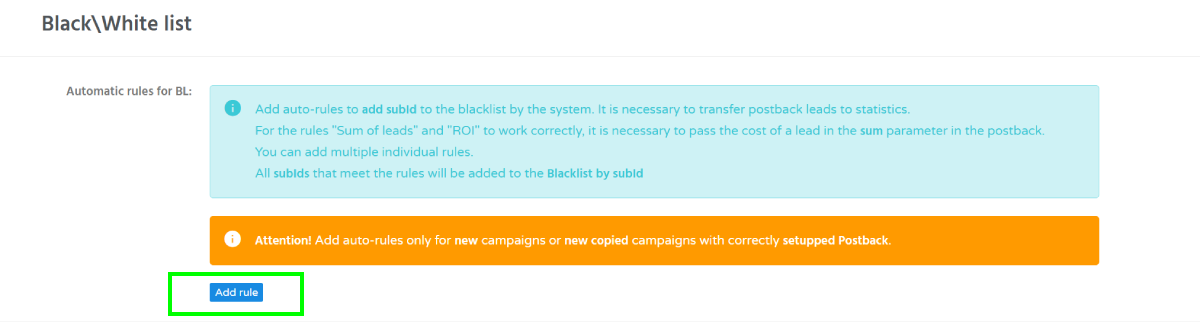
3. Configure rule conditions to automatically blacklist unprofitable sources.
Each rule uses IF-THEN logic. If both configured conditions are met, the traffic source is automatically added to the campaign blacklist.
The first part of condition, it's one of these parameters:
1. Spent
2. Show
3. Click [](https://wiki.dao.ad/uploads/images/gallery/2026-05/automatic-bl-2-v310526.png)
4. The second condition can use one of the following metrics:
1. Number of clicks
2. Number of leads (main)
3. Number of leads (all)
4. Sum of leads
5. ROI
6. Cost per lead (CPL main)
7. Cost per lear (CPL all)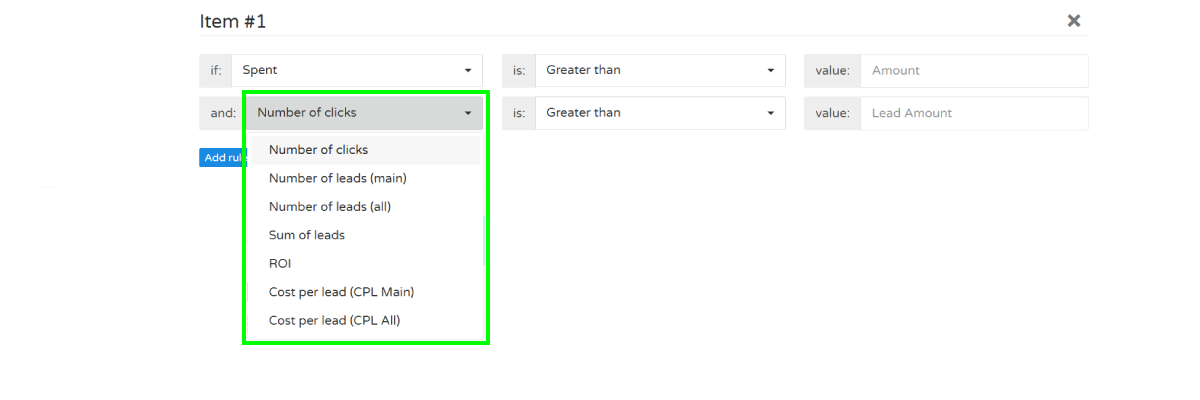
5. Repeat the process to create additional autoblacklisting rules if needed.
##### Troubleshooting
**Issue:** Sources are not being added to the blacklist automatically
**Solution:**
- Verify that your campaign has a correctly configured postback.
- Make sure conversion data is being received in campaign statistics.
- Check that the automatic rule conditions have been met.
- Confirm that the campaign is active.
**Issue:** ROI, [CPL](https://wiki.dao.ad/books/terms-a-c/page/cpl "CPL"), or lead-based rules are not working.
**Solution:**
- Verify that conversion postbacks are being received.
- Make sure lead values are passed correctly in the postback.
- Wait until enough clicks and conversions have been collected to meet the rule conditions.
##### Verification
When a rule is triggered, the corresponding Source ID will be automatically added to the campaign blacklist.
##### Related
- [Blacklist and Whitelist Targeting](https://wiki.dao.ad/books/optimization-reporting/page/blacklist-and-whitelist-targeting "Blacklist and Whitelist Targeting")
- [Traffic volume and bid recommendations](https://dao.ad/en/traffic-volumes)
- [Micro-bidding Tool](https://wiki.dao.ad/books/optimization-reporting/page/micro-bidding-tool "Micro-bidding Tool")
# Bid Adjustments
##### Summary
This guide explains how to optimize campaign performance by adjusting bids based on traffic quality, conversion rates, and profitability.
##### Before You Begin
- Role: Advertiser
- Required information:
- Active campaign with traffic data
- At least 500–1000 impressions or several conversions
- Estimated time: 5 minutes
##### What is bid adjustment?
Bid adjustment is the process of increasing or decreasing your bid to maximize ROI and campaign performance.
Increasing bids may help you:
- Win more auctions
- Receive more traffic
- Scale profitable placements
Decreasing bids may help you:
- Reduce spending
- Improve ROI
- Eliminate unprofitable traffic
##### When should you adjust bids?
Recommended situations:
**Increase bid when:**
- ROI is positive
- Conversions are consistent
- Traffic volume is limited
- High-performing zones lose auctions
**Decrease bid when:**
- ROI is negative
- CPC is too high
- Traffic does not convert
- Cost exceeds revenue
##### Bid adjustment strategy
**Conservative Optimization**
| ROI > 30% | Increase bid by 5-10% |
| ROI 0 - 30% | Keep current bid |
| ROI < 0% | Decrease bid by 5-10% |
**Aggressive Scaling**
| ROI > 50% | Increase bid by 15 - 25% |
| ROI 10 - 50% | Increase bid by 5 - 10% |
| ROI < 0% | Decrease bid by 10 - 20% |
##### Optimization by Traffic Source
**Zone / Placement Optimization**
Increase bids for:
- Top converting zones
- High CTR placements
- Consistent profitable sources
Decrease bids for:
- High spend, no conversions
- Low-quality placements
- Sources with poor ROI
**GEO Optimization**
| GEO | ROI | Action |
|---|
| US | 45% | Increase bid |
| DE | 28% | Keep |
| BR | -15% | Decrease bid |
**Device Optimization**
| Device | ROI | Action |
|---|
| Android | 38% | Increase bid |
| iOS | 12% | Keep |
| Desktop | -22% | Decrease bid |
##### Best Practices
- Avoid large bid changes.
- Adjust bids gradually.
- Wait for sufficient data before making decisions.
- Review campaign performance daily.
- Combine bid adjustments with blacklists and whitelists.
##### Common Mistakes
❌ Increasing bids without enough data
❌ Optimizing after only a few clicks
❌ Ignoring ROI and focusing only on CTR
❌ Making multiple bid changes within a short period
❌ Scaling unprofitable traffic
##### Related
- [Statistics KPI](https://wiki.dao.ad/books/optimization-reporting/page/statistics-kpi "Statistics KPI")
- [Statistics Overview](https://wiki.dao.ad/books/optimization-reporting/page/statistics-overview "Statistics Overview")
- [Blacklist and Whitelist Targeting](https://wiki.dao.ad/books/optimization-reporting/page/blacklist-and-whitelist-targeting "Blacklist and Whitelist Targeting")
- [Automatic Rules for Blacklisting](https://wiki.dao.ad/books/optimization-reporting/page/automatic-rules-for-blacklisting "Automatic Rules for Blacklisting")
- [Micro-bidding Too](https://wiki.dao.ad/books/optimization-reporting/page/micro-bidding-tool "Micro-bidding Tool")
# CPA Goal in Popunder
##### Summary
CPA Goal is an automated optimization tool that helps advertisers optimize campaign traffic toward a desired Cost Per Lead ([CPL](https://wiki.dao.ad/books/terms-a-c/page/cpl "CPL")).
The advertiser sets the Target CPL, while DAO.AD automatically calculates and adjusts traffic prices based on campaign performance and conversion data.
##### Before You Begin
- **Role:** Advertiser
- **Required information:**
- Active campaign
- Correctly configured [postback](https://wiki.dao.ad/books/tracking-postback "Tracking & Postback")
- Target CPL
##### How CPA Goal Works
CPA Goal automatically optimizes traffic based on campaign conversion performance.
The advertiser only needs to set the **Target CPL**. Individual bids are not set manually.
The system analyzes traffic performance and automatically adjusts the price for individual traffic sources according to the available conversion data.
Optimization is performed separately for each **sub\_id + GEO** combination.
##### Postback Requirement
CPA Goal relies on conversion data received through the campaign postback.
If the campaign is running but conversions are not being received through the postback, the system cannot perform optimization.
Make sure that your postback is correctly configured before launching the campaign.
A test conversion is **recommended**, but it is not mandatory if you are confident that the postback is working correctly.
##### Campaign Structure
For more effective optimization, we recommend using:
- **1 campaign = 1 GEO**
- sufficient campaign budget for traffic testing.
Each sub\_id is tested separately. If a campaign contains many GEOs or has a very limited budget, the available budget is distributed across more combinations, which may limit the amount of data available for optimization.
##### Whitelist & Blacklist
Standard campaign **whitelist and blacklist settings** also apply to CPA Goal campaigns.
**Keep in mind** that sources or sub\_ids added to a whitelist may not necessarily be included in the traffic available for CPA Goal optimization.
##### Related
- [Tracking & Postback](https://wiki.dao.ad/books/tracking-postback/page/tracking-section "Tracking section")
- [Campaign Statistics](https://wiki.dao.ad/books/optimization-reporting/page/statistics-overview "Statistics Overview")