# JavaScript Tag (Video)

##### <span style="color: rgb(0, 0, 0);">Summary</span>

<span style="color: rgb(0, 0, 0); white-space: pre-wrap;">Generate the </span>[JavaScript](https://wiki.dao.ad/books/terms-g-k/page/javascript "JavaScript")<span style="color: rgb(0, 0, 0); white-space: pre-wrap;"> code required to display the Video ad format on your website. Configure the display settings, generate the script, and add it to your website.</span>

##### <span style="color: rgb(0, 0, 0);">Before You Begin</span>

- <span style="color: rgb(0, 0, 0);">Role: Webmaster</span>
- <span style="color: rgb(0, 0, 0);">Required information:</span>
    - <span style="color: rgb(0, 0, 0);">Approved Site traffic source</span>
    - <span style="color: rgb(0, 0, 0); white-space: pre-wrap;">Access to your website's </span>[HTML](https://wiki.dao.ad/books/terms-g-k/page/html "HTML")<span style="color: rgb(0, 0, 0); white-space: pre-wrap;"> source code</span>
- <span style="color: rgb(0, 0, 0);">Estimated time: 3-5 minutes</span>

<p class="callout warning">****Important!**** <span style="color: rgb(0, 0, 0); white-space: pre-wrap;">JavaScript code is available only for Site traffic sources. If your source type is </span>****Link****<span style="color: rgb(0, 0, 0); white-space: pre-wrap;">, create and approve a </span>****Site**** <span style="color: rgb(0, 0, 0);">Source before continuing.</span></p>

##### <span style="color: rgb(0, 0, 0);">Steps</span>

1. <span style="color: rgb(0, 0, 0);">After your Site Source has been approved, navigate to Sources - Video and open the source you want to use.</span>
2. <span style="color: rgb(0, 0, 0);">Open the Code page and click Code to open the JavaScript code configuration settings.</span>
3. <span style="color: rgb(0, 0, 0);">Configure the following parameters:</span>  
    <span style="color: rgb(0, 0, 0);">Type - Select one of the available video integration modes:</span>  
    <span style="color: rgb(0, 0, 0);">a) VAST Ad Link</span>  
    <span style="color: rgb(0, 0, 0);">b) Video Player (Pre-roll)</span>  
    <span style="color: rgb(0, 0, 0);">c) Slider Ad</span>  
    <span style="color: rgb(0, 0, 0);">d) Video Pre-roll + Slider</span>  
    \<span style="color: rgb(0, 0, 0);">- Container ID - ID of the HTML element where the video player will be inserted.</span>  
    \<span style="color: rgb(0, 0, 0);">- Position Y - Choose whether the video player appears at the top or bottom of the page.</span>  
    \<span style="color: rgb(0, 0, 0);">- Position X - Choose whether the video player appears on the left or right side of the page.</span>  
    \<span style="color: rgb(0, 0, 0); background-color: rgb(255, 255, 255);">- Size - Select the size of the video player.</span>  
    \<span style="color: rgb(0, 0, 0); background-color: rgb(255, 255, 255);">- Count video - Maximum number of video ads shown in sequence.</span>  
    \<span style="color: rgb(0, 0, 0);">- Max Ad View Count - Maximum number of times the Slider Ad can be displayed.</span>  
    \<span style="color: rgb(0, 0, 0);">- Pause Before End - Number of seconds before the end of the video when playback is paused.</span>  
    \<span style="color: rgb(0, 0, 0);">- Renew Slider Ad Interval - Time interval (in seconds) before the Slider Ad is refreshed.</span>  
    \<span style="color: rgb(0, 0, 0);">- Volume - Default playback volume for the video.</span>
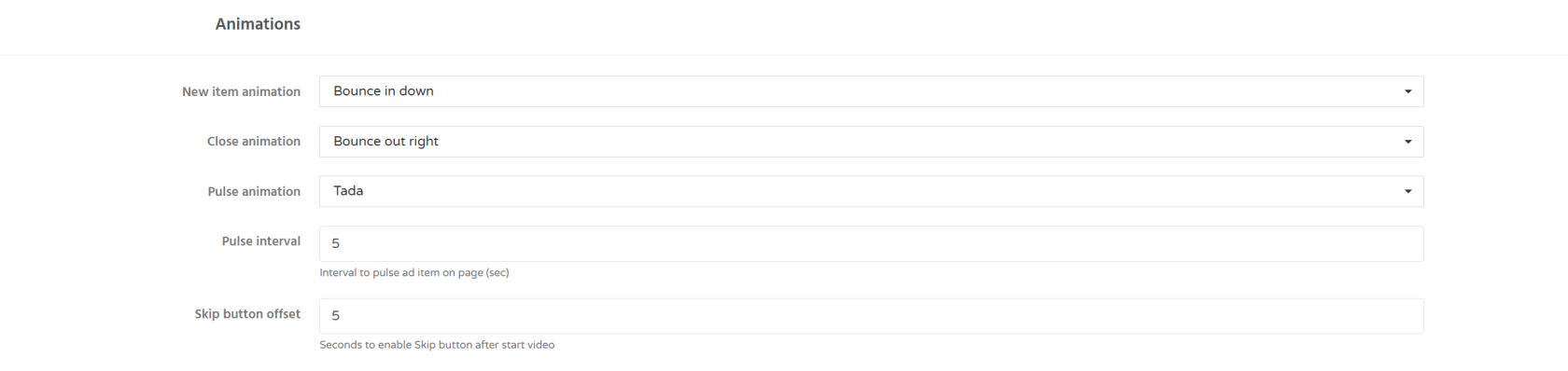
4. <span style="color: rgb(0, 0, 0);">You can also customize the appearance and animations of the video player using the settings below.</span>![image.png](https://wiki.dao.ad/uploads/images/gallery/2026-07/scaled-1680-/fx4image.png)
5. <span style="color: rgb(0, 0, 0);">Click Get Code to generate the JavaScript code, then copy and paste it into your website.</span>

##### <span style="color: rgb(0, 0, 0);">Troubleshooting</span>

****Issue:**** <span style="color: rgb(0, 0, 0);">The downloaded script does not work.</span>

****Solutions:**** <span style="color: rgb(0, 0, 0);">Check whether a VPN, browser extension, or another JavaScript library is preventing the script from loading correctly.</span>

##### <span style="color: rgb(0, 0, 0);">Related</span>

- [<span style="color: rgb(224, 62, 45);">Site vs Link</span>](https://wiki.dao.ad/books/getting-started-QiA/page/site-vs-link "Site vs Link")
- [<span style="color: rgb(224, 62, 45);">Create a Site Source</span>](https://wiki.dao.ad/books/getting-started-QiA/page/create-a-site-source "Create a Site Source")
- [<span style="color: rgb(224, 62, 45);">Site/App Approval</span>](https://wiki.dao.ad/books/getting-started-QiA/page/siteapp-approval "Site/App Approval")
- [Placement Rules](https://wiki.dao.ad/books/getting-started-QiA/page/placement-rules "Placement Rules")