Targeting by country
Summary
Country targeting allows you to receive traffic from specific countries or predefined country groups.
Before You Begin
- Role: Advertiser
- Required information:
- country names, ISO country codes, or predefined country groups
- Estimated time: 1-3 minutes
Steps
- On the campaign creation page, locate the Targeting section and the Country block.
- You can configure countries using one of the following methods.
Option 1: Enter country names or ISO codes
- enter one or more country names or ISO two-letter country codes separated by commas, then click Apply.

- Update the country set by selecting one of the following options:
Add items - adds the selected countries to the current list;
Replace items - replaces the current list with the selected countries.
Option 2: Use predefined country groups
- select one of the predefined country groups available in the system

- Update the country set by choosing Add items or Replace items
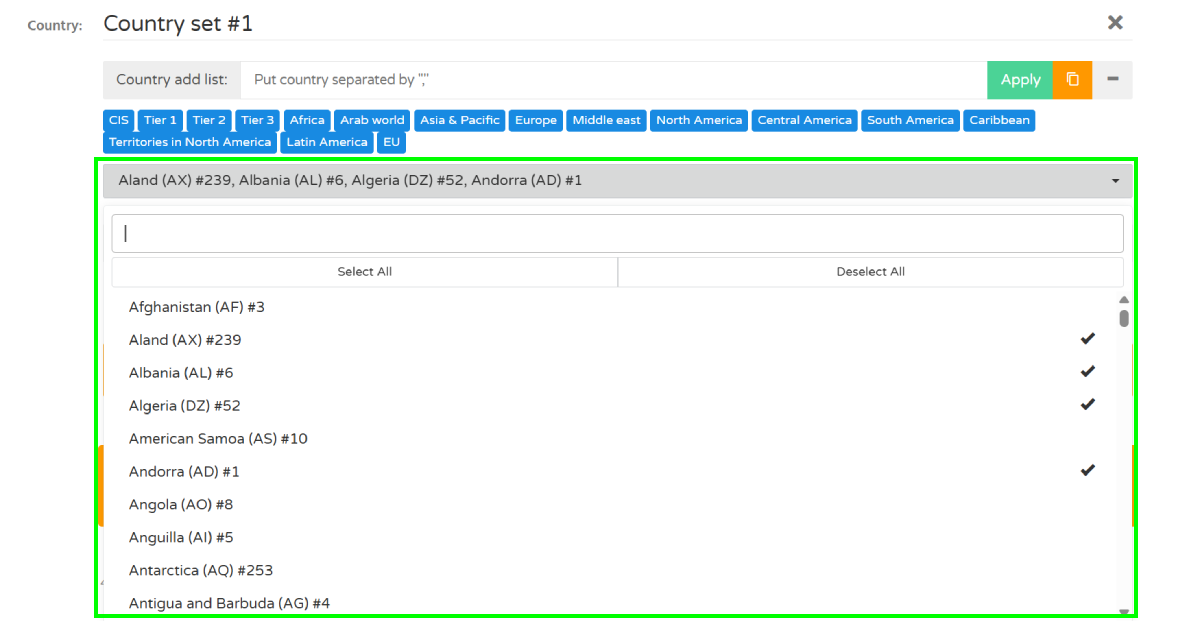
Option 3: Select countries from the dropdown list
- Select countries individually from the dropdown list

- changes are applied automatically
3. Enter the bid value for the selected country set. Price per 1000 clicks

You can create up to 10 country sets within a single campaign. Use Add Country Set to assign different bids to different GEO groups.
Troubleshooting
Issue: Country not found
Solutions: If you can not find country name
- verify the country's ISO two-letter code.
- make sure the country name is entered in English using Latin characters.
Issue: Selected countries are not receiving traffic
Solution:
- Verify that the campaign status is Active.
- Check your bid amount.
- Make sure the selected countries contain available traffic.
- Review other targeting restrictions such as OS, browser, or whitelist settings.