# Campaign Limits and Capping
##### Summary
Use campaign limits to control your budget and traffic volume. DAO.AD allows you to configure daily and total limits for clicks, impressions, and campaign spend.
##### Before You Begin
- Role: Advertiser
- Estimated time: ~2 minutes
##### Steps
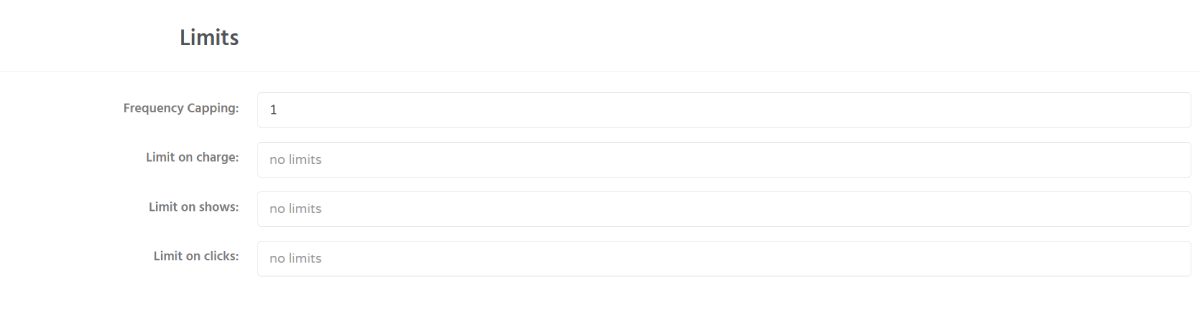
1. Locate the **Limits** section at the bottom of the page.
2. Available settings:
\- Frequency Capping - сontrols how many times a unique user can see your push advertisement within 24 hours;
\- Limit on charge - total budget for this ad campaign
\- Limit on shows - maximum number of impressions for this campaign
\- Limit on clicks - total clicks for this ad campaign
**Information:** We recommend setting limits slightly higher than your target values. Push notifications may still generate impressions or clicks after delivery has already been initiated
3. The following daily limits can be configured:
\- Limit on charge - total budget for this ad campaign
\- Limit on shows - total impressions for this ad campaign
\- Limit on clicks - total clicks for this ad campaign
**Feature:** You can also configure click and budget limits for individual traffic sources.
##### Troubleshooting
**Issue:** campaign spend exceeded the configured budget
**Solution:**
- Push notifications are not always delivered instantly. Users may still generate impressions or clicks after a campaign limit has been reached. For this reason, small budget or traffic overruns may occasionally occur.
##### Verification
After saving the campaign, the configured limits are applied immediately.
##### Related
- [Traffic volume and bid recommendations](https://dao.ad/en/traffic-volumes)
- [Micro-bidding Tool](https://wiki.dao.ad/books/optimization-reporting/page/micro-bidding-tool "Micro-bidding Tool")
- [Automatic Rules for Blacklisting](https://wiki.dao.ad/books/optimization-reporting/page/automatic-rules-for-blacklisting "Automatic Rules for Blacklisting")
- [Targeting by operating system](https://wiki.dao.ad/books/getting-started/page/targeting-by-operating-system "Targeting by operating system")
- [Targeting by traffic quality and category](https://wiki.dao.ad/books/getting-started/page/targeting-by-traffic-quality-and-category "Targeting by traffic quality and category")