# Getting Started
# Account & Access
# Create an account as Webmaster
##### Summary
Create a Webmaster account on DAO.AD to start monetizing your traffic.
##### Before You Begin
- Role: Webmaster
- Required information:
- Email address
- Password
- Telegram username
- Estimated time: 5 minutes
##### Steps
1. Open the [DAO.AD homepage](https://dao.ad/) and click **Registration**.
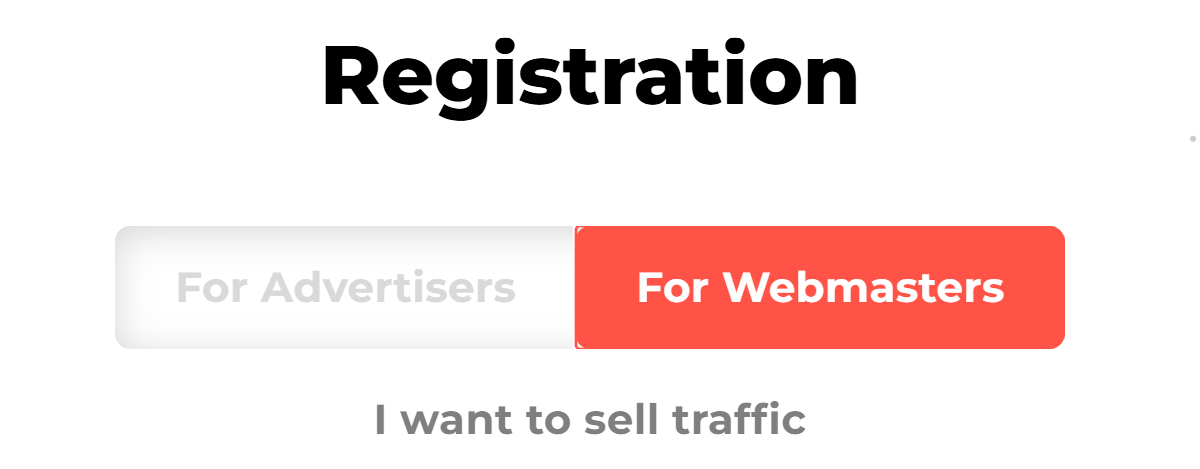
2. At the top of the registration form, select **For Webmasters.** The selected role will be highlighted in red.
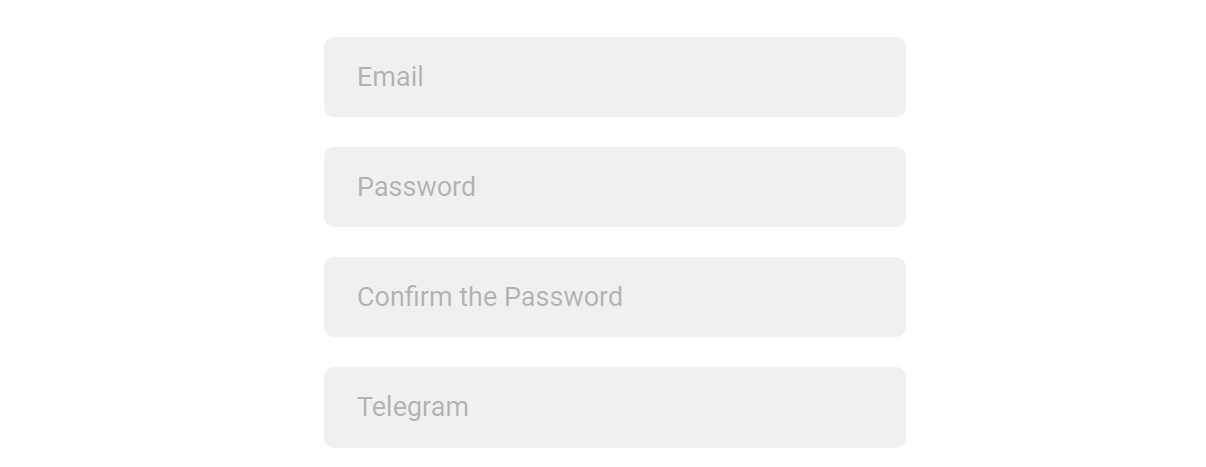
3. Enter the following information Email, Password, Password Confirmation, Telegram.
Note: We use your Telegram contact to reach you quickly if needed.
4\. Complete the “I’m not a robot” CAPTCHA and accept the [Privacy Policy](https://dao.ad/policy) & [Terms of Use.](https://dao.ad/terms-use)
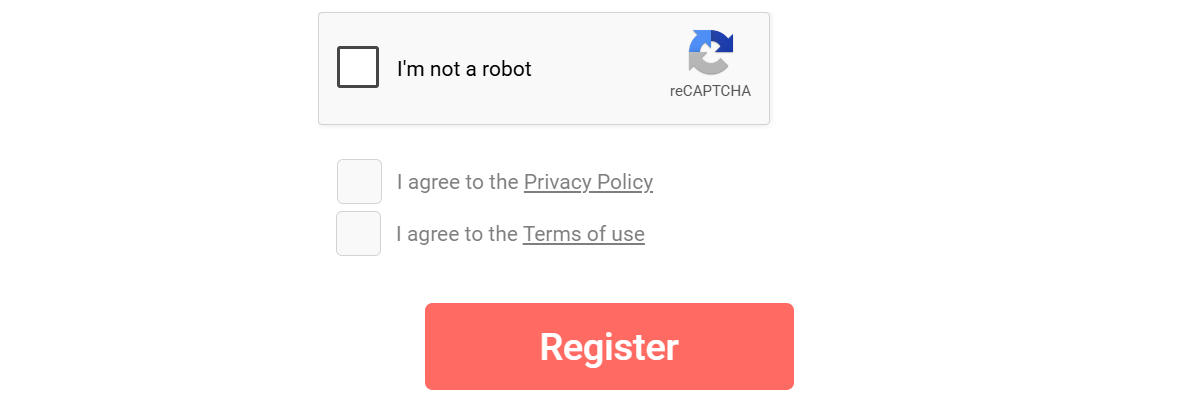
5\. Click **Register**.
##### Verification
After Registration, an activation code will be sent to your email address. Enter the code to verify and activate your account.
##### Related
- [Account verification](https://wiki.dao.ad/books/getting-started/page/account-verification)
- [Password recovery](https://wiki.dao.ad/books/getting-started/page/password-recovery "Password recovery")
- [Create a Site Source](https://wiki.dao.ad/books/getting-started-QiA/page/create-a-site-source "Create a Site Source")
- [Create a Link Source](https://wiki.dao.ad/books/getting-started-QiA/page/create-a-link-source "Create a Link Source")
# Account verification
##### Summary
Verify your account using the activation code sent to your email address.
##### Before You Begin
- Role: Webmaster
- Required information:
- Confirmation code
- Estimated time: 1 minute
##### Steps
1. After completing [Registration](https://wiki.dao.ad/books/getting-started/page/create-an-account-as-advertiser), a confirmation email will be sent to your email address.
2. Check your inbox and make sure the sender name is DAO.AD Robot and the email address is no-reply\[@\]dao.ad.
3. Click the verification link in the email.
**Important:** Never share your activation link or activation code with anyone. DAO.AD managers will never ask for your confirmation codes or passwords.
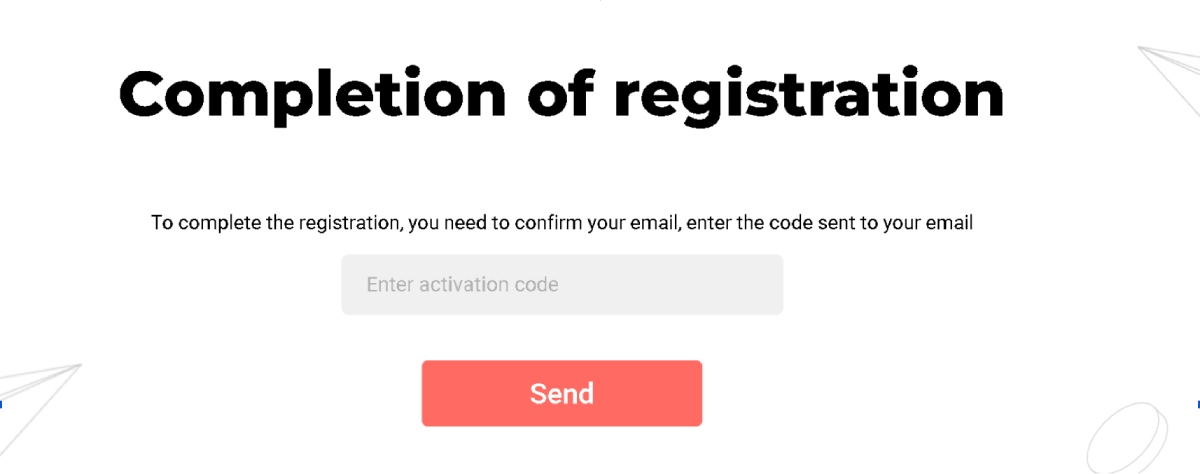
4\. After successful verification, you will be redirected to the Authorization page.
##### Troubleshooting
**Issue:** Activation code not received
**Solution:** If you have not received the activation code, check your Spam folder. If the email is still missing, contact DAO.AD Support.
**Issue:** Incorrect account type selected
**Solution:** If you selected the wrong account role during registration, contact DAO.AD Support for assistance.
##### Related
- [Two-Factor Authentication](https://wiki.dao.ad/books/getting-started/page/two-factor-authentication "Two-factor Authentication")
- [Password recovery](https://wiki.dao.ad/books/getting-started/page/password-recovery "Password recovery")
- [Site vs Link](https://wiki.dao.ad/books/getting-started-QiA/page/site-vs-link "Site vs Link")
# Two-factor authentication
##### Summary
Log in to the DAO.AD Dashboard using Two-Factor authentication ([2FA](https://wiki.dao.ad/books/terms/page/2fa "2FA")).
##### Before You Begin
- Role: Webmaster
- Required information:
- 2FA code
- Estimated time: 2 minutes
##### Steps
1. After entering your email address and password, a [2FA](https://wiki.dao.ad/books/terms/page/2fa "2FA") code will be sent to your email address.
2. Check your inbox and make sure the sender is DAO.AD Robot and the email address is no-reply\[@\]dao.ad.
3. Copy the authentication code from the email.
**Important:** Never share your authorization code with anyone. DAO.AD managers will never ask for your confirmation codes or passwords.
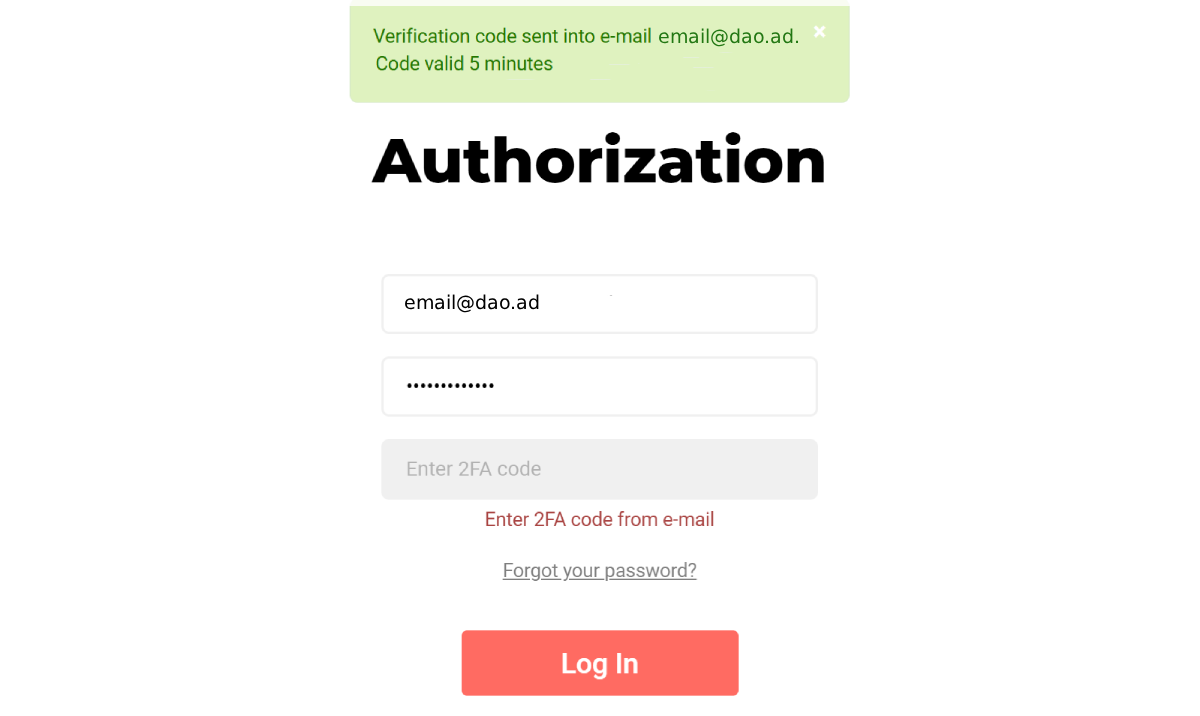
4\. After successful authorization, you will be redirected to the DAO.AD Dashboard.
##### Troubleshooting
**Issue:** Authorization code not received
**Solutions:** If you have not received the authorization code
- check your Inbox and Spam folder;
- make sure you entered the correct email address and password;
- try logging in using a different browser;
- contact DAO.AD Support
**Issue:** Authorization code expired
**Solution:** Restart the authorization process and request a new code.
##### Related
- [Password recovery](https://wiki.dao.ad/books/getting-started/page/password-recovery "Password recovery")
- [Account verification](https://wiki.dao.ad/books/getting-started/page/account-verification "Account verification")
- [Invoices & Billing Documents](https://wiki.dao.ad/books/billing/page/invoices-billing-documents "Invoices & Billing Documents")
# Password recovery
##### Summary
Recover your DAO.AD password if you forgot or lost access to it.
##### Before You Begin
- Role: Webmaster
- Required information:
- Email address
- Estimated time: 3 minutes
##### Steps
1. Enter the email address associated with your DAO.AD account. 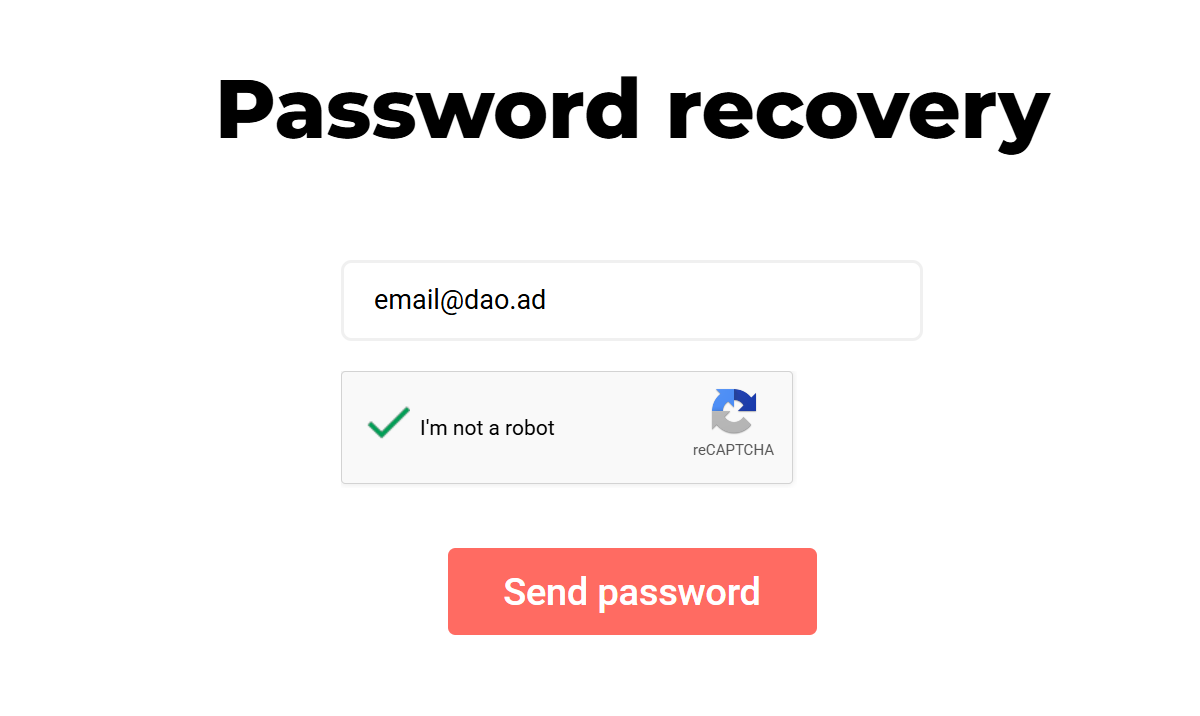
2. Check your inbox and Spam folder. The recovery email will be sent from no-reply\[@\]dao.ad.
3. Click to the recovery link in email.
**Important:** Never share your recovery link with anyone. DAO.AD managers will never ask for your confirmation codes or passwords.
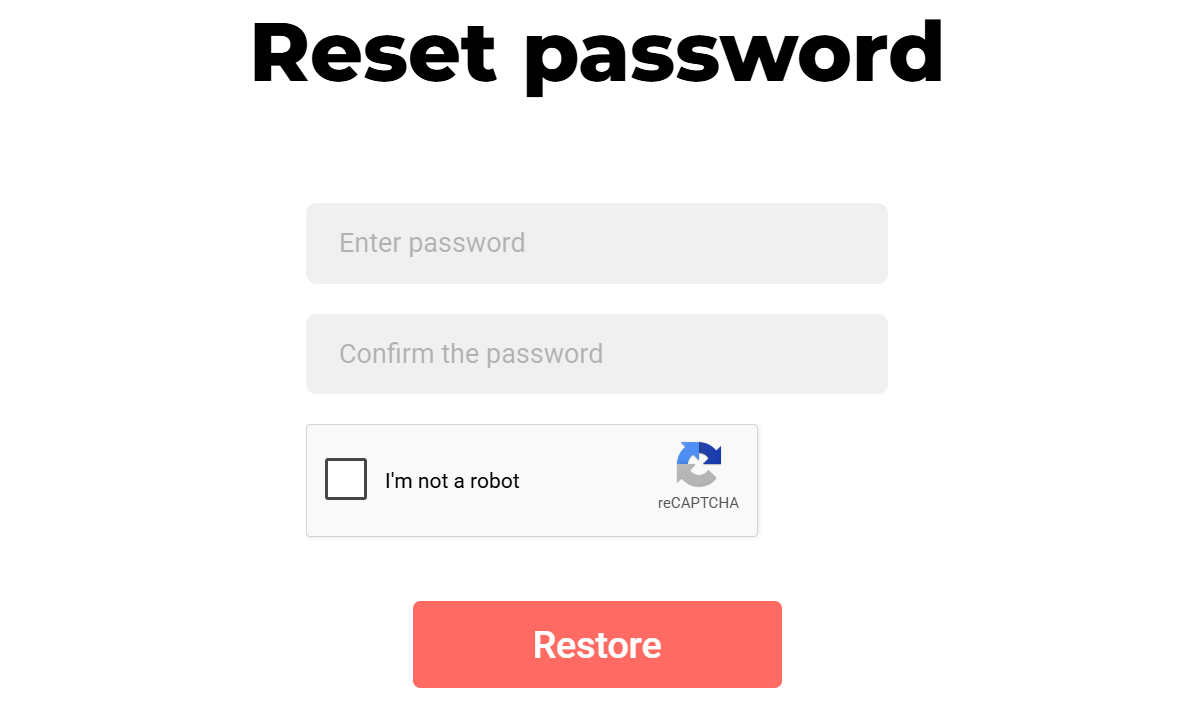
4\. Enter your new password, complete the “I’m not a robot” verification, and click **Restore**.
Password should contain at least 6 characters.
##### 
##### Troubleshooting
**Issue:** Recovery link not received
**Solutions:** If you have not received the authorization code
- check your Inbox and Spam folder;
- make sure you entered the correct email address;
- try logging in using a different browser;
- contact DAO.AD Support
**Issue:** Authorization code expired
**Solution:** Restart the authorization process and request a new code.
##### Related
- [Two-Factor Authentication](https://wiki.dao.ad/books/getting-started/page/two-factor-authentication "Two-Factor Authentication")
- [Account verification](https://wiki.dao.ad/books/getting-started/page/account-verification)
# Traffic Sources
# Site vs Link
##### Summary
DAO.AD supports two traffic source types: Site and Link.
Choose Site when you own a website and can install DAO.AD ad code directly on the page.
Choose Link when you want to monetize traffic without direct access to a website, such as traffic from social networks, messengers, redirects, or other external sources.
##### Before You Begin
- Role: Webmaster
- Estimated time: 1 minute
#####
##### Source Types
****Site****
A Site source is used when ****you own or manage a website****.
You will need to:
- Add your website URL
- Verify website ownership
- Provide traffic statistics
- Install DAO.AD ad code on your website
Typical examples:
- News websites
- Blogs
- Content portals
- Forums
- Entertainment websites
****Link****
A Link source is used when traffic is sent from external platforms and ****you can not install code directly on a website****.
You will need to:
- Specify a traffic source name
- Select a category
- Provide traffic statistics
Typical examples:
- Social media traffic
- Messenger traffic
- Redirect traffic
- Purchased traffic
- Arbitrage traffic
****Comparison****
| ****Feature****
| ****Site****
| ****Link****
|
|---|
| Website required
| Yes
| No
|
| Website verification
| Yes
| No
|
| Traffic statistics required
| Yes
| Yes
|
| Ad code installation
| Yes
| No
|
| Suitable for website owners
| Yes
| No
|
| Suitable for external traffic
| No
| Yes
|
#####
When to Choose Site
Choose ****Site**** if:
- You own the website
- You can modify website code
- You want to monetize website visitors directly
#####
When to Choose Link
Choose ****Link**** if:
- You buy traffic from external sources
- You use social media traffic
- You use redirect or arbitrage traffic
- You do not have direct access to website code
#####
Related
- [Create a Site Source](https://wiki.dao.ad/books/getting-started-QiA/page/create-a-site-source "Create a Site Source")
- [Create a Link Source](https://wiki.dao.ad/books/getting-started-QiA/page/create-a-link-source "Create a Link Source")
- [Site/App Approval](https://wiki.dao.ad/books/getting-started-QiA/page/siteapp-approval "Site/App Approval")
- [Placement Rules](https://wiki.dao.ad/books/getting-started-QiA/page/placement-rules "Placement Rules")
# Create a Site Source
##### Summary
A Site source allows you to monetize traffic from a website that you own or manage. To create a Site source, you must provide your website URL, verify ownership, select the appropriate category, and submit the source for approval.
##### Before You Begin
- Role: Webmaster
- Required information:
\- Website URL
\- Website traffic statistics
\- Access to website files or source code
- Estimated time: 3-5 minutes
#####
##### Steps
1. Navigate to the ****Sources**** section and select the desired ad format.
2. Click Create Source.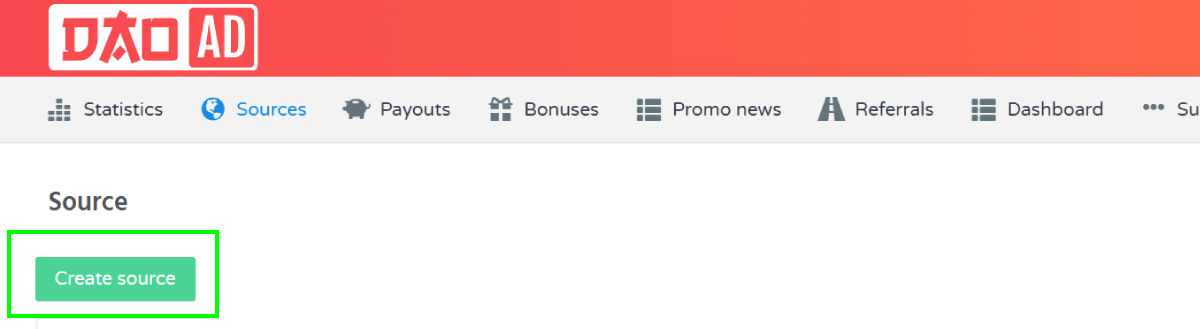
3. Enter the ****Source name**** and choose ****Site**** as the source type.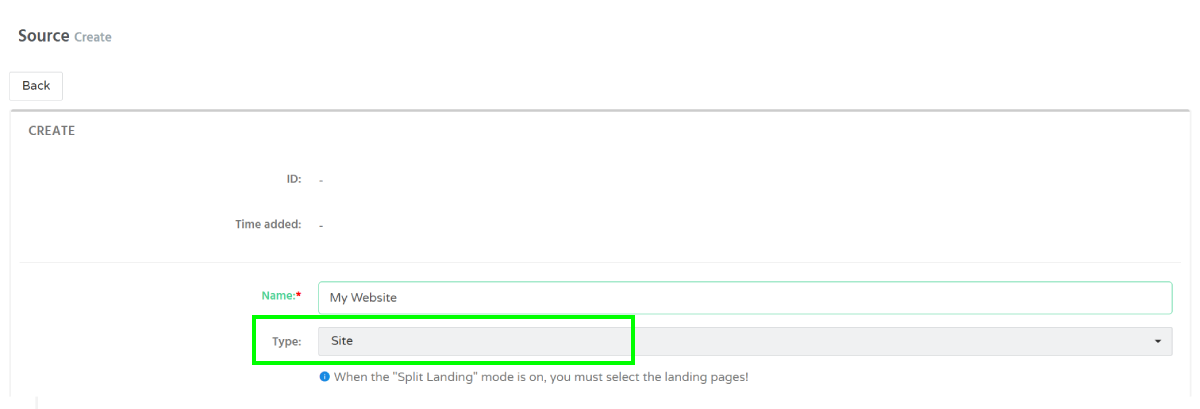
4. Select a ****Landing ID**** and specify your ****website URL****.
5. Select the appropriate category:
\- [Mainstream](https://wiki.dao.ad/books/terms-l-o/page/mainstream "Mainstream")
\- [Racy](https://wiki.dao.ad/books/terms-p-t/page/racy "Racy")
\- [Adult](https://wiki.dao.ad/books/terms-a-c/page/adult "Adult")
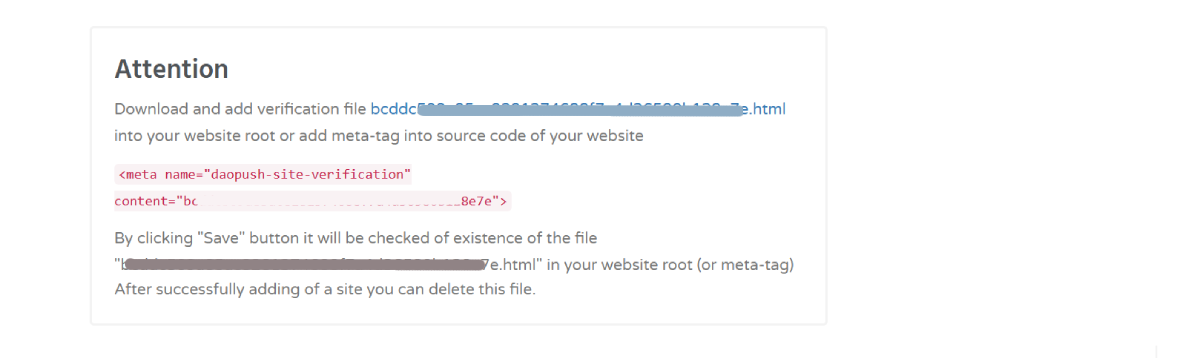
6. Verify website ownership.
DAO.AD requires website ownership verification before a source can be approved.
You can verify ownership by:
\- Uploading the verification file to your website root directory, or
\- Adding the provided meta tag to your website header.
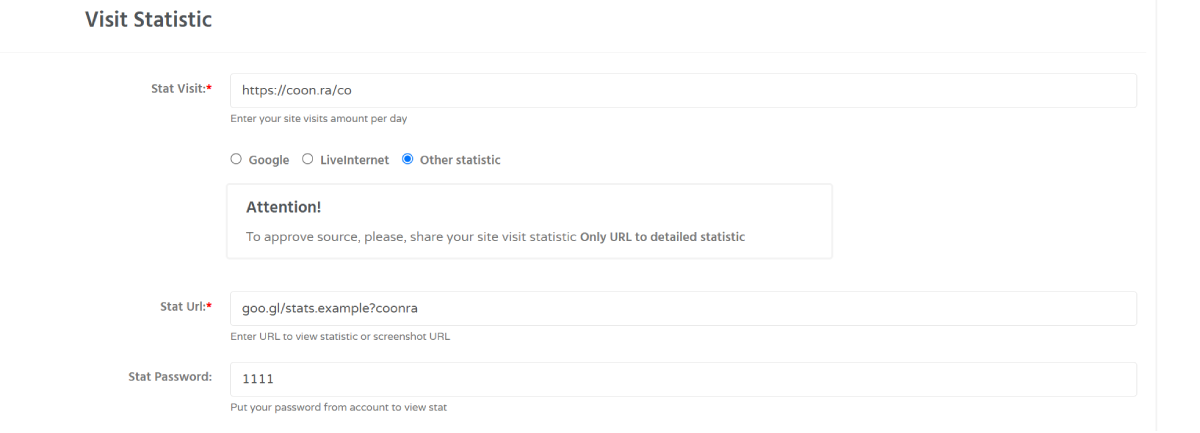
1. Provide traffic statistics
Enter your website traffic information.
Supported statistics sources:
\- [Google Analytics](https://wiki.dao.ad/books/terms-g-k/page/google-analytics "Google Analytics") (provide traffic statistics to the moderation team for [Approval](https://wiki.dao.ad/books/getting-started-QiA/page/siteapp-approval "Approval"))
\- LiveInternet (to approve source, share your site visits statistics ****Only URL to detailed statistic****)
\- Other analytics platforms
Provide:
\- Daily [Visits](https://wiki.dao.ad/books/terms-u-z/page/visits "Visits")
\- Statistics [URL](https://wiki.dao.ad/books/terms-u-z/page/url "URL")
\- Statistics access details (if required)
7. Click Save to submit the source for moderation.
After submission, the moderation team will verify the provided information and approve or decline the source.
##### Troubleshooting
****Issue:**** Website ownership verification fails.
****Solution:**** Make sure that:
- The verification file is accessible from your website root directory, or
- The verification meta tag has been added correctly.
After updating the website, try saving the source again.
#####
Related
- [Site vs Link](https://wiki.dao.ad/books/getting-started-QiA/page/site-vs-link "Site vs Link")
- [Site/App Approval](https://wiki.dao.ad/books/getting-started-QiA/page/siteapp-approval "Site/App Approval")
- [Create a Link Source](https://wiki.dao.ad/books/getting-started-QiA/page/create-a-link-source "Create a Link Source")
- [Traffic Type](https://wiki.dao.ad/books/terms-p-t/page/traffic-type "Traffic Type")
# Create a Link Source
##### Summary
A Link source allows you to monetize traffic without owning a website. It is designed for webmasters who use social media, redirect traffic, arbitrage traffic, or other external traffic sources.
****Note:**** Link sources do not require website ownership verification or code installation. They are intended for traffic sources that do not have a dedicated website.
##### Before You Begin
- Role: Webmaster
- Required information:
\- Source name
\- Traffic category
\- Traffic statistics URL
- Estimated time: 1-2 minutes
#####
##### Steps
1. Navigate to the ****Sources**** section and select the desired ad format.
2. Click Create Source.
3. Enter the ****Source name**** and choose ****Link**** as the source type.
[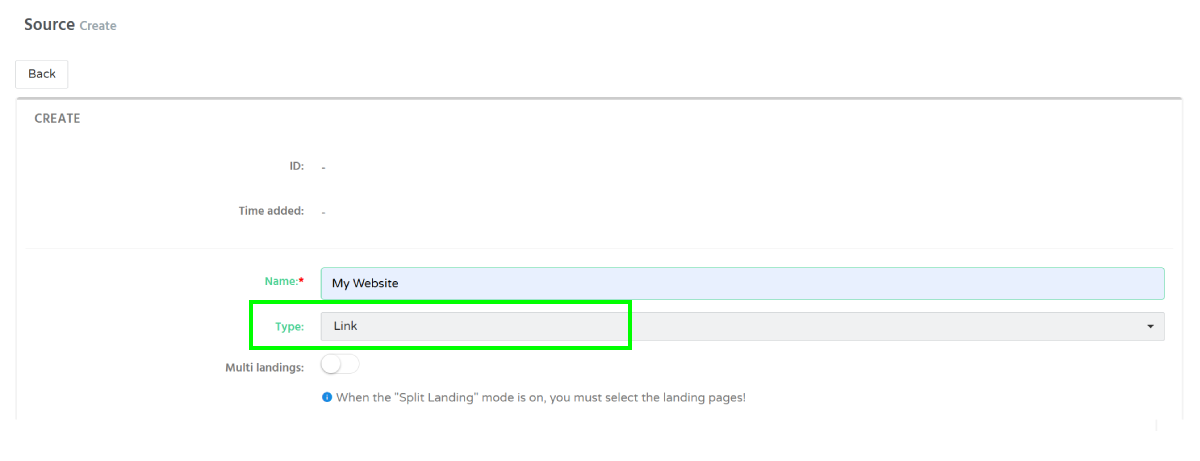](https://wiki.dao.ad/uploads/images/gallery/2026-06/scaled-1680-/link-source-v22062026.png)
4. Choose one of the available landing pages that matches your traffic source.
5. Select the appropriate category:
\- [Mainstream](https://wiki.dao.ad/books/terms-l-o/page/mainstream "Mainstream")
\- [Racy](https://wiki.dao.ad/books/terms-p-t/page/racy "Racy")
\- [Adult](https://wiki.dao.ad/books/terms-a-c/page/adult "Adult")
6. Configure Postback (Optional)
If you use a tracker or external system, you can configure a postback URL to receive conversion events.
Available postback types:
\- [CPA](https://wiki.dao.ad/books/terms-a-c/page/cpa "CPA")
\- RevShare
\- All Events
Enter your Postback URL and select the appropriate postback type.
7. After submission, the moderation team will verify the provided information and approve or decline the source.
##### Troubleshooting
****Issue:**** Source was declined during moderation.
****Solution:**** Make sure that:
- The selected category matches your traffic.
- The landing page is appropriate for your audience.
- Traffic statistics are available upon request.
- The provided information accurately describes the traffic source.
After updating the website, try saving the source again.
#####
Related
- [Site vs Link](https://wiki.dao.ad/books/getting-started-QiA/page/site-vs-link "Site vs Link")
- [Site/App Approval](https://wiki.dao.ad/books/getting-started-QiA/page/siteapp-approval "Site/App Approval")
- [Create a Link Source](https://wiki.dao.ad/books/getting-started-QiA/page/create-a-link-source "Create a Link Source")
- [Traffic Type](https://wiki.dao.ad/books/terms-p-t/page/traffic-type "Traffic Type")
# Site/App Approval
##### Summary
Every new traffic source submitted to DAO.AD is reviewed before it becomes active. The moderation team verifies ownership, traffic quality, content compliance, and technical requirements to ensure the source meets platform policies.
****Note:**** Link sources do not require website ownership verification or code installation. They are intended for traffic sources that do not have a dedicated website.
##### Before You Begin
- Role: Webmaster
- Required information:
- Approved Site or Link source
- Working website or traffic source
- Correct traffic category
- Accessible traffic statistics
Estimated time: Usually a few minutes (may take longer depending on workload)
#####
##### Approval Process
After submitting a new traffic source, DAO.AD performs a moderation review before activation.
During the review, moderators verify:
- Website ownership (for Site sources)
- Website availability
- Traffic quality
- Selected category
- Content compliance
- Technical requirements
- Policy compliance
If everything meets the requirements, the source status changes to ****Approved**** and traffic monetization becomes available.
##### Possible Source Statuses
| ****Status****
| ****Description****
|
|---|
| Pending
| The source is waiting for moderation.
|
| Approved
| The source has been approved and is ready for monetization.
|
| Rejected
| The source was declined because it doesn't meet one or more requirements.
|
| Disabled
| The source has been manually disabled or suspended.
|
##### ****Common reasons for rejection****
A source may be rejected for several reasons, including:
- Website cannot be accessed.
- Verification failed.
- Incorrect or misleading category.
- Invalid or insufficient traffic statistics.
- Unsupported website content.
- Low-quality or prohibited traffic.
- Violation of DAO.AD policies.
If your source is rejected, review the provided information, correct any issues, and submit it again.
##### How to Speed Up Approval
To reduce moderation time:
- Make sure your website is publicly accessible.
- Verify website ownership correctly.
- Select the appropriate category.
- Provide accurate traffic statistics.
- Submit complete information.
- Ensure your website complies with DAO.AD policies.
##### Troubleshooting
****Issue:**** My source is still pending.
****Solution:**** Approval usually takes only a few minutes, but may require additional review during periods of high moderation activity.
****Issue:**** My source was rejected.
****Solution:**** If you believe the rejection was made by mistake, contact your account manager or DAO.AD Support.
#####
Related
- [Site vs Link](https://wiki.dao.ad/books/getting-started-QiA/page/site-vs-link "Site vs Link")
- [Create a Site Source](https://wiki.dao.ad/books/getting-started-QiA/page/create-a-site-source "Create a Site Source")
- [Create a Link Source](https://wiki.dao.ad/books/getting-started-QiA/page/create-a-link-source "Create a Link Source")
# Placement Rules
##### Summary
Follow these placement guidelines to maximize performance while providing a positive user experience. Proper ad placement also helps your traffic pass moderation more quickly.
##### Before You Begin
- Role: Webmaster
- Required information:
- Approved Site Source
- Installed JavaScript Tag
- Estimated time: 5 minutes
Recommended placement
1. Install DAO.AD tags only on pages that receive real visitor traffic.
Examples:
- News websites
- Blogs
- Forums
- Entertainment websites
- Utility websites
2. Avoid placing ads
Do not place advertising tags on:
- Login pages
- Payment pages
- Checkout pages
- Error pages
- Empty pages
- Hidden pages
- Pages with no content
3. User experience
For best performance:
- Avoid excessive advertising.
- Do not cover important page elements.
- Ensure ads do not block navigation.
- Keep page loading fast.
4. Popunder recommendations
- Trigger only after user interaction.
- Avoid multiple popups on the same page.
- Configure reasonable delay intervals.
5. In-Page Push recommendations
- Do not cover menus or buttons.
- Place notifications where they do not interfere with reading.
- Use moderate animation settings.
6. Video recommendations
- Keep the video player visible.
- Avoid overlapping page controls.
- Choose an appropriate player size for desktop and mobile devices.
##### Troubleshooting
****Issue:**** Low CTR or reduced revenue.
****Solutions:**** Review your ad placement and verify that advertisements are visible without negatively affecting the visitor experience.
##### Related
- [JavaScript Tag (Push)](https://wiki.dao.ad/books/integration/page/javascript-tag-push "JavaScript Tag (Push)")
- [JavaScript Tag (Inpage Push)](https://wiki.dao.ad/books/integration/page/javascript-tag-inpage-push "JavaScript Tag (Inpage Push)")
- [JavaScript Tag (Video)](https://wiki.dao.ad/books/integration/page/javascript-tag-video "JavaScript Tag (Video)")
- [Site/App Approval](https://wiki.dao.ad/books/getting-started-QiA/page/siteapp-approval "Site/App Approval")
# Traffic Quality
##### Summary
This page explains how DAO.AD evaluates traffic quality and which types of traffic are not allowed.
##### Before You Begin
- Role: Webmaster
- Required information:
- Active DAO.AD account
- Estimated time: 2 minutes
##### How DAO.AD Checks Traffic Quality
****DAO.AD uses multiple methods to monitor traffic quality, including:****
- proprietary anti-fraud systems;
- additional traffic analysis services;
- automated checks;
- manual reviews.
Traffic quality is continuously monitored to ensure that traffic meets DAO.AD requirements and advertiser standards.
##### Prohibited Traffic
****The following types of traffic are not accepted:****
- Bot traffic - traffic generated by bots or automated systems.
- Incentivized traffic - traffic generated by offering users rewards or other incentives for performing actions.
- Artificial clicks - artificially generated clicks that do not represent genuine user activity.
- Fraudulent traffic - any traffic generated through fraudulent or deceptive methods.
- VPN and Proxy traffic - DAO.AD does not accept traffic generated through VPNs or proxies, as it may be rejected by advertisers.
- Any traffic that violates the DAO.AD platform rules.
##### Why Traffic Quality Matters
High-quality traffic is important for maintaining stable monetization and advertiser demand.
****Traffic quality can affect:****
- advertising demand;
- CPM and CPC rates;
- overall revenue;
- the availability of advertising campaigns.
Maintaining genuine user traffic helps ensure better monetization performance.
##### Account Restrictions
****Accounts may be restricted or blocked in cases of:****
- prohibited traffic;
- violations of DAO.AD platform rules;
- attempts to manipulate traffic or advertising activity;
- systematic fraud.
If suspicious or fraudulent activity is detected, DAO.AD may take action against the traffic source or account.
##### What Should I Do If My Traffic Quality Is Questioned?
****If you believe your traffic has been incorrectly classified or you need clarification about traffic quality:****
- Review your traffic sources and traffic-generation methods.
- Make sure your traffic does not include prohibited or artificial sources.
- Check whether VPN or Proxy traffic is being used.
- Contact your personal manager or DAO.AD Support for assistance.
##### Related
- [Site/App Approval](https://wiki.dao.ad/books/getting-started-QiA/page/siteapp-approval "Site/App Approval")
- [Placement Rules](https://wiki.dao.ad/books/getting-started-QiA/page/placement-rules "Placement Rules")
- [Traffic Statistics](https://wiki.dao.ad/books/statistics-optimization/page/traffic-statistics "Traffic Statistics")
- [Create a Site Source](https://wiki.dao.ad/books/getting-started-QiA/page/create-a-site-source "Create a Site Source")
- [Create a Link Source](https://wiki.dao.ad/books/getting-started-QiA/page/create-a-link-source "Create a Link Source")
- [Terms of Use](https://dao.ad/terms-use "Terms of Use")
#####