Funding your account is required before launching advertising campaigns. DAO.AD supports multiple payment methods and currencies depending on your region.
##### Before You Begin - Role: Advertiser - Required information: \- Billing details \- Promo code (optional) - Estimated time: 2 minutes ##### Steps 1. Before funding your account, make sure your profile information is complete. 2. Go to your [User Profile](https://dao.ad/en/profile) and complete all required fields: \- your name (if not present) \- your last name \- country of residence \- billing address 3. Save information, confirming by current password. 4. If you are funding the account on behalf of a company, also provide: \- company name \- Reg. numer \- Tax number 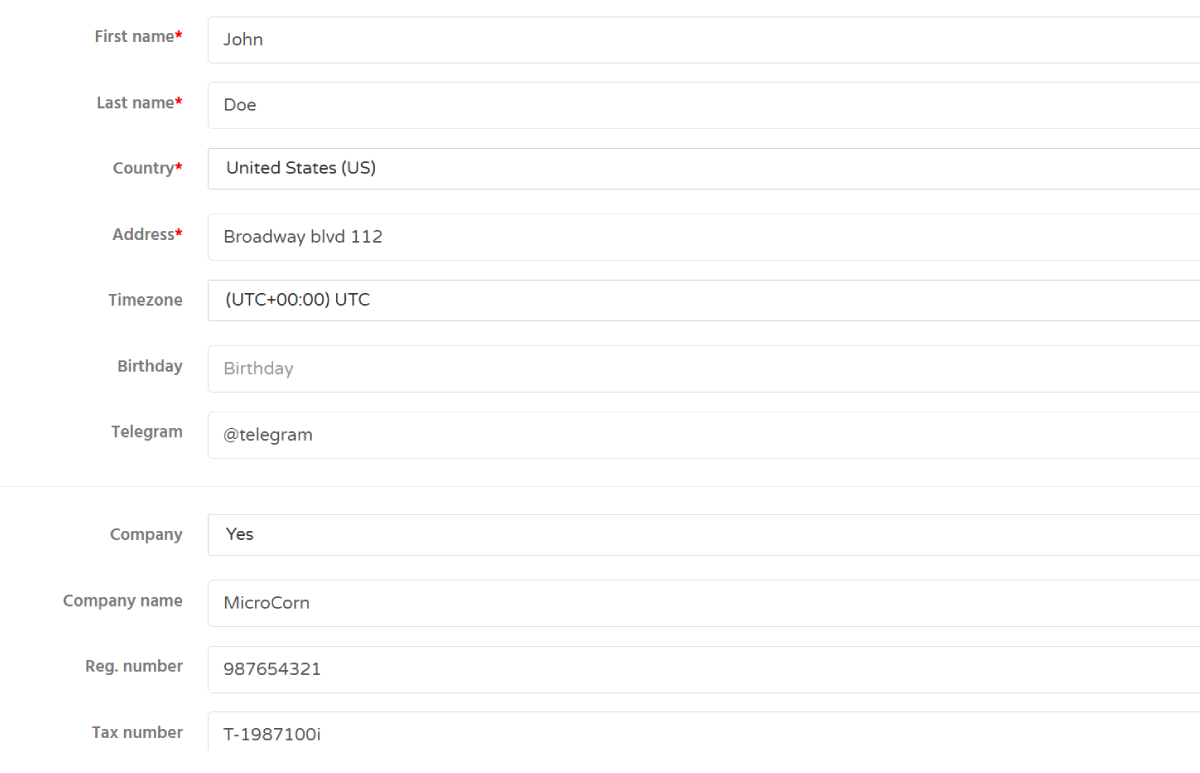 5. Open the [Balance page](https://dao.ad/en/manage/payment/balance) or click your current account balance in the top-right corner of the dashboard. 6. Select your preferred payment method and follow the on-screen instructions.****Minimal deposit 50 USD****
DAO.AD does not charge additional fees for deposits. Any transaction fees depend on the selected payment provider, your country of residence, and possible currency conversion rates applied by your bank or payment service.
7. If you have a promo code, enter it during the deposit process to receive additional bonuses. ##### Troubleshooting ****Issue:**** Some payment methods are not available. ****Solutions:**** Some payment methods may not be available directly through the platform. If your preferred method is not listed, contact DAO.AD support to discuss alternative payment options. - Examples of alternative payment methods: \- Payoneer \- Bank Transfer \- ACH Transfer \- Other region-specific payment solutions ##### Related - [Account verification](https://wiki.dao.ad/books/getting-started/page/account-verification "Account verification") - [Create a push campaign](https://wiki.dao.ad/books/getting-started/page/create-a-push-campaign "Create a push campaign") - [Password recovery](https://wiki.dao.ad/books/getting-started/page/password-recovery "Password recovery") # Invoices & Billing Documents ##### Summary DAO.AD does not automatically generate invoices through the platform. If you require an invoice or other billing documents, please contact your DAO.AD manager or Support team.Funding your account is required before launching advertising campaigns. DAO.AD supports multiple payment methods and currencies depending on your region.
##### Before You Begin - Role: Advertiser - Required information: - Billing profile - Company details (if applicable) - VAT information (if applicable) - Estimated time: 2-3 minutes ##### Billing Documents DAO.AD does not provide automatic invoice generation within the platform. If you need an invoice for your payment or accounting purposes, please contact your assigned DAO.AD manager or the Support team. Invoices are prepared manually upon request. ##### Requesting an Invoice To request an invoice, provide the following information: - Account email - Company name (if applicable) - Billing address - VAT number (if applicable) Providing complete billing information helps us prepare your documents more quickly. ##### Keeping Your Billing Information Updated Always keep your billing information up to date. Update your profile whenever any of the following changes: - Company name - Registered address - VAT registration number - Legal entity information - Tax status Providing accurate billing information helps prevent delays when preparing invoices. ##### Billing Support If you have any questions regarding invoices, payments, or billing documents, please contact your DAO.AD manager or Support. The team will assist you with: - Invoice requests - Billing information updates - Payment confirmations - Accounting documents ##### Troubleshooting ****Issue:**** I need an invoice for my payment. ****Solution:**** Contact your DAO.AD manager or Support and provide your payment details. An invoice will be prepared upon request. ****Issue:**** My billing information has changed. ****Solution:**** Update your billing profile and notify your DAO.AD manager before requesting a new invoice. ##### Related - [Fund Your Account](https://wiki.dao.ad/books/billing/page/fund-your-account "Fund Your Account") - [Currencies, Fees & Exchange Rates](https://wiki.dao.ad/books/billing/page/currencies-fees-exchange-rates "Currencies, Fees & Exchange Rates") - [Taxes & Documents](https://wiki.dao.ad/books/billing/page/taxes-documents "Taxes & Documents") - [Refunds & Chargebacks](https://wiki.dao.ad/books/billing/page/refunds-chargebacks "Refunds & Chargebacks") # Currencies, Fees & Exchange Rates ##### Summary DAO.AD supports multiple payment providers that may process transactions in different currencies. Depending on the selected payment method, additional fees or currency conversion charges may apply. ##### Before You Begin - Role: Advertiser or Webmaster - Required information: - Selected payment method - Billing currency - Estimated time: 2 minutes ##### Currency conversion Some payment providers or banks may automatically convert your payment into the required billing currency. Exchange rates are determined by your payment provider or financial institution and may differ from market rates.****Note:**** DAO.AD does not control or set currency exchange rates.
##### Payment provider fees DAO.AD does not charge additional processing fees for deposits or payouts. However, third-party payment providers may apply their own charges, including: - Transaction fees - Banking commissions - Currency conversion fees - International transfer fees These fees depend on your selected payment method and financial institution. ##### Bank charges If you make payments via bank transfer, your bank may charge additional service fees. These charges are determined by your bank and are not collected by DAO.AD. ##### Taxes Users are responsible for paying any taxes required by their local laws. DAO.AD is not responsible for taxes or financial obligations imposed by local tax authorities.The total amount received by DAO.AD may differ from the amount sent if your payment provider deducts transaction or conversion fees.
Currency conversion fees are determined solely by the payment provider or your bank.
##### Troubleshooting ****Issue:**** The deposited amount is lower than expected. ****Solution:**** Check whether your payment provider deducted transaction or currency conversion fees before the payment reached DAO.AD. ****Issue:**** I was charged an unexpected banking fee. ****Solution:**** Contact your bank or payment provider for details regarding transfer or conversion charges. ##### Related - [Fund Your Account](https://wiki.dao.ad/books/billing/page/fund-your-account "Fund Your Account") - [Invoices & Self-Billing](https://wiki.dao.ad/books/billing/page/invoices-billing-documents "Invoices & Self-Billing") - [Refunds & Chargebacks](https://wiki.dao.ad/books/billing/page/refunds-chargebacks "Refunds & Chargebacks") - [Taxes & Documents](https://wiki.dao.ad/books/billing/page/taxes-documents "Taxes & Documents")